
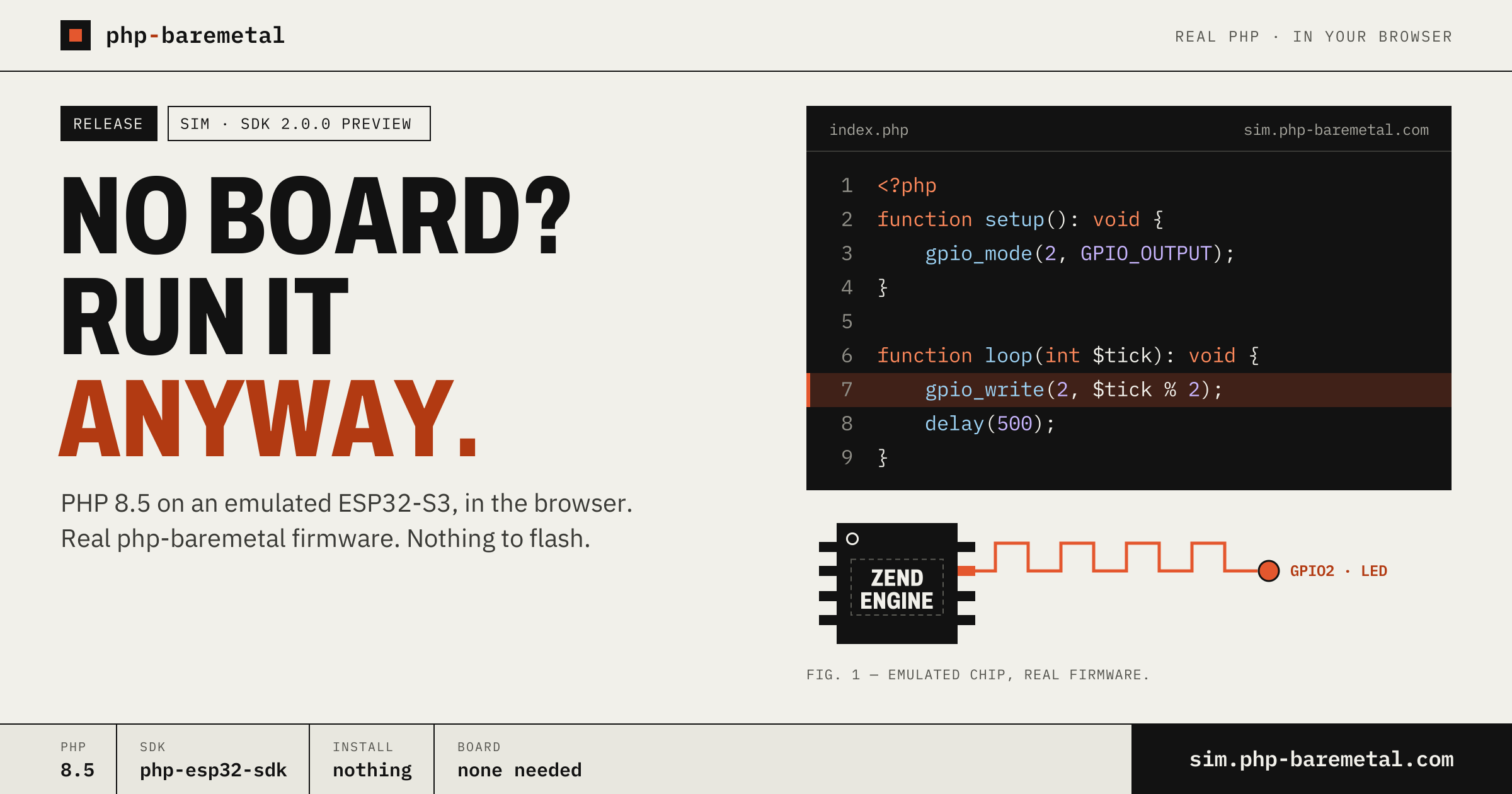
You want to try PHP on a microcontroller, but there is no board on your desk. Now that is no longer a reason to wait. php-baremetal sim, at https://sim.php-baremetal.com, runs a real php-baremetal firmware on an emulated ESP32-S3, in the browser. You edit index.php, press Run, and an LED on the canvas starts blinking.
It is the same idea as the rest of the project: this is real PHP, and your index.php is the firmware. The simulator does not fake PHP in JavaScript. It builds the firmware with phpbm, exactly as for a physical board, and boots it on an emulated chip.
Open https://sim.php-baremetal.com, pick an example or start a new project, press Run. PHP 8.5 boots on an emulated ESP32-S3 with 8 MB of PSRAM, drives LEDs, reads buttons, talks I²C and prints to a serial monitor. Packages come from the registry through composer.json. Nothing to install, no board, no flashing.
The simulator already runs the new php-baremetal SDK 2.0.0 ("sdk": "esp32@^2.0" in composer.json), before it ships. The release is planned for the end of November. Until then, treat the simulator as a preview: things may change between now and the release.
What the simulator is
A microcontroller is a small computer on a single chip: CPU, memory and pins you can switch on and off from code. Each pin you control from software is a GPIO (general-purpose input/output). The ESP32-S3 is the chip we target today. Next to it on the board sits PSRAM, extra RAM where the PHP runtime keeps its heap.
The simulator emulates that chip: QEMU, a machine emulator, runs the firmware instruction by instruction as if it were on silicon, with 8 MB of PSRAM attached. Around it there is a circuit canvas: a board, LEDs, resistors, push buttons and the wires between them, plus a serial monitor for whatever your code prints.
You can choose from three ESP32-S3 boards. Each one carries two files, the same two that make up any php-baremetal project:
index.php, your code;composer.json, the packages, which are the features compiled into the firmware. The emulator and the editor come from Velxio, the open-source board emulator by David Montero Crespo (https://github.com/davidmonterocrespo24/velxio). php-baremetal sim is a fork of it, released under the same AGPLv3 licence, with its source at https://github.com/php-baremetal/php-baremetal-sim. The emulation is Velxio's work; what we added is the PHP layer: the project files, the build server and the examples.
Your first Run
A new project starts with a blinking LED already wired to GPIO2 through a 330 ohm resistor. This is the whole index.php:
This is the init-loop runtime: setup() runs once at boot, then loop() runs forever. $tick counts the iterations, so $tick % 2 alternates 0 and 1, and the LED changes state every 500 ms.
-
Step 1: Open the editor
Go to https://sim.php-baremetal.com/editor, or open one of the examples from https://sim.php-baremetal.com/examples.
-
Step 2: Edit the PHP
Change the delay, add an
echo, rename the constant. It is plain PHP 8.5. -
Step 3: Press Run
The server builds the firmware and the emulated chip boots it. The LED on the canvas follows
gpio_write(). -
Step 4: Read the serial monitor
Whatever you
echoshows up at the bottom of the editor.
This is what the serial monitor prints when the starter project boots:
The first line comes from the chip's boot ROM, the second from the firmware, and the last one is your echo. PHP_VERSION reports 8.5.11 because what runs is the upstream Zend engine, cross-compiled for the chip. It is not a subset, not a reimplementation and not a transpiler.
Packages, and what happens when you press Run
composer.json is a regular Composer file. Its require block lists the packages, and the extra.baremetal block says how to build the firmware:
The Libraries button adds packages from the registry at https://repository.php-baremetal.com: native extensions such as ext-i2c or ext-events, device drivers, and PHP extensions such as php-mbstring. The ones that only bind hardware (the HALs, conductor) are hidden, because conductor adds them on its own.
On the public instance, the server checks every composer.json before it builds. Only php-baremetal/* packages from the registry are allowed, Composer scripts are dropped, and board and storage are fixed to the simulated board (generic-esp32s3-quad) and embedded. You choose the runtime: init-loop, event-driven or web-server.
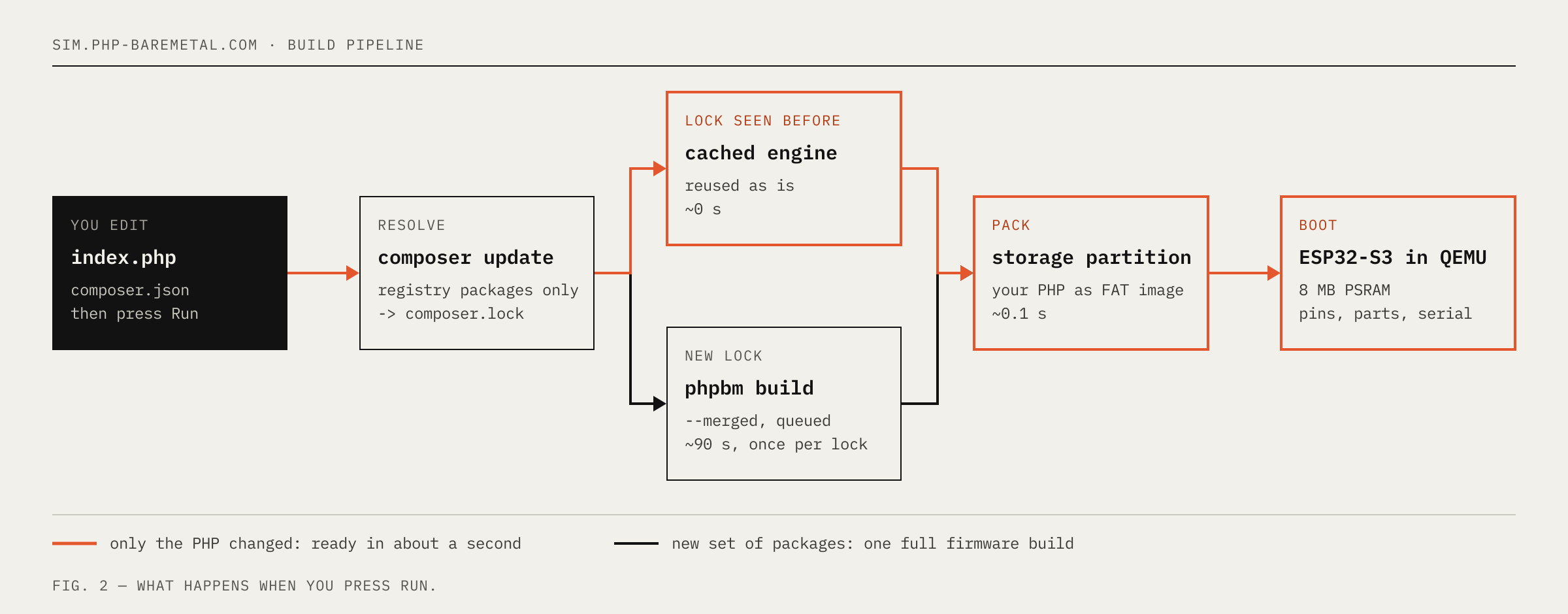 A php-baremetal firmware has two parts: the engine (the PHP runtime plus the extensions you required) and a storage partition that holds your PHP files. The simulator keeps them apart:
- A set of packages it has never seen triggers a full
phpbm build. It takes about a minute and a half, once percomposer.lock, and the result is cached. - Only the PHP changed? The engine is reused and only the storage partition is rebuilt. Run is ready in about a second. So you wait once when you add a package, and after that every edit runs almost immediately.
Four examples to start from
Each example opens with its circuit already wired and a prebuilt firmware, so the first Run boots immediately.
| Example | What it shows | Packages |
|---|---|---|
| Blink SOS | setup() configures GPIO2, loop() blinks SOS in Morse code |
ext-gpio, ext-sys |
| Button → LED | loop() reads a button on GPIO4 and mirrors it to the LED |
ext-gpio, ext-sys |
| I²C clock | scans the I²C bus, then reads the time from a DS3231 real-time clock every second | ext-i2c, ext-sys |
| Button events | event-driven: a button press arrives as a typed event, no polling loop | ext-events, ext-gpio |
The two button examples are the best way to compare runtimes. Same circuit, LED on GPIO2 and button on GPIO4, written in two different ways:
loop() polls the pin every 20 ms. Simple, and the CPU never rests.
What works on the virtual bench
The simulator only marks a peripheral as tested if it has actually been run in the simulator. This is the state of the preview:
| Peripheral | Parts | From PHP | Status |
|---|---|---|---|
| GPIO | LEDs, push buttons | ext-gpio |
Tested |
| Interrupts | button edges delivered as events | ext-events · watch_gpio() |
Tested |
| Serial | serial monitor (UART0) | echo · print |
Tested |
| I²C | DS3231 real-time clock; the bench also emulates BMP280 and MPU6050 | ext-i2c |
Tested |
| SPI | ST77916 round display | ext-spi + driver |
Not tested yet |
| Addressable LEDs | WS2812 | ext-led + led-ws2812 |
Not available |
| WiFi / web | none | ext-wifi · ext-web |
Not available |
Addressable LEDs need the chip's RMT peripheral, and the emulated ESP32-S3 does not model it yet. The emulated chip has no radio, so WiFi and the web-server runtime have nothing to connect to.
QEMU does not model the internal pull-up resistor, so a button input reads 0 until the button is first driven. In the Button → LED example, the LED is on at boot. Timing in the simulator is also not a measurement of the real chip. Use the simulator to check that your code works, and use a board to measure how fast it runs.
From the simulator to a real board
A simulator project is already a php-baremetal project. On a real board, the PHP sources live in project-src/, and board and storage in extra.baremetal describe your hardware instead of the simulated one. The rest of composer.json stays the same.
-
Step 1: Install the tools
Install the CLI and the Composer plugin, then the SDK.
bash -
Step 2: Scaffold the project
Create the project, then copy your
index.phpintoproject-src/and yourrequirelines intocomposer.json.bash -
Step 3: Point it at your board
Set
boardto your board andstoragetoembeddedormicrosd. The supported values are listed in the docs at https://www.php-baremetal.com/documentation/phpbm. -
Step 4: Flash and watch
Install the cross-compilation toolchain once, write the firmware to the board, and open the same serial output you saw in the browser.
bash
Flashing means writing the firmware image into the chip's flash memory over USB. A toolchain is the compiler set that builds code for a different CPU than the one in your laptop, which is what cross-compilation means.
Try it
No board, no install: open the editor and press Run.
Start at https://sim.php-baremetal.com, browse the examples at https://sim.php-baremetal.com/examples, and find packages at https://repository.php-baremetal.com. When you move to hardware, the phpbm documentation is at https://www.php-baremetal.com/documentation/phpbm. SDK 2.0.0 is planned for the end of November. The simulator runs it today, so you can try the new SDK before it ships.
ESP32 is a trademark of Espressif Systems. php-baremetal is an independent project, not affiliated with or endorsed by Espressif. The simulator is built on Velxio, an independent open-source project, under the AGPLv3.