
Blog 19 min read
Is php-baremetal/php-esp32 1.5.0 production ready?
Still a lot of work ahead, but 1.5.0 takes two huge steps: hidden source code for products coming off the line, and a board that sleeps at ~0.95 mA when idle.

Gianfrancesco Aurecchia
@GianfriAur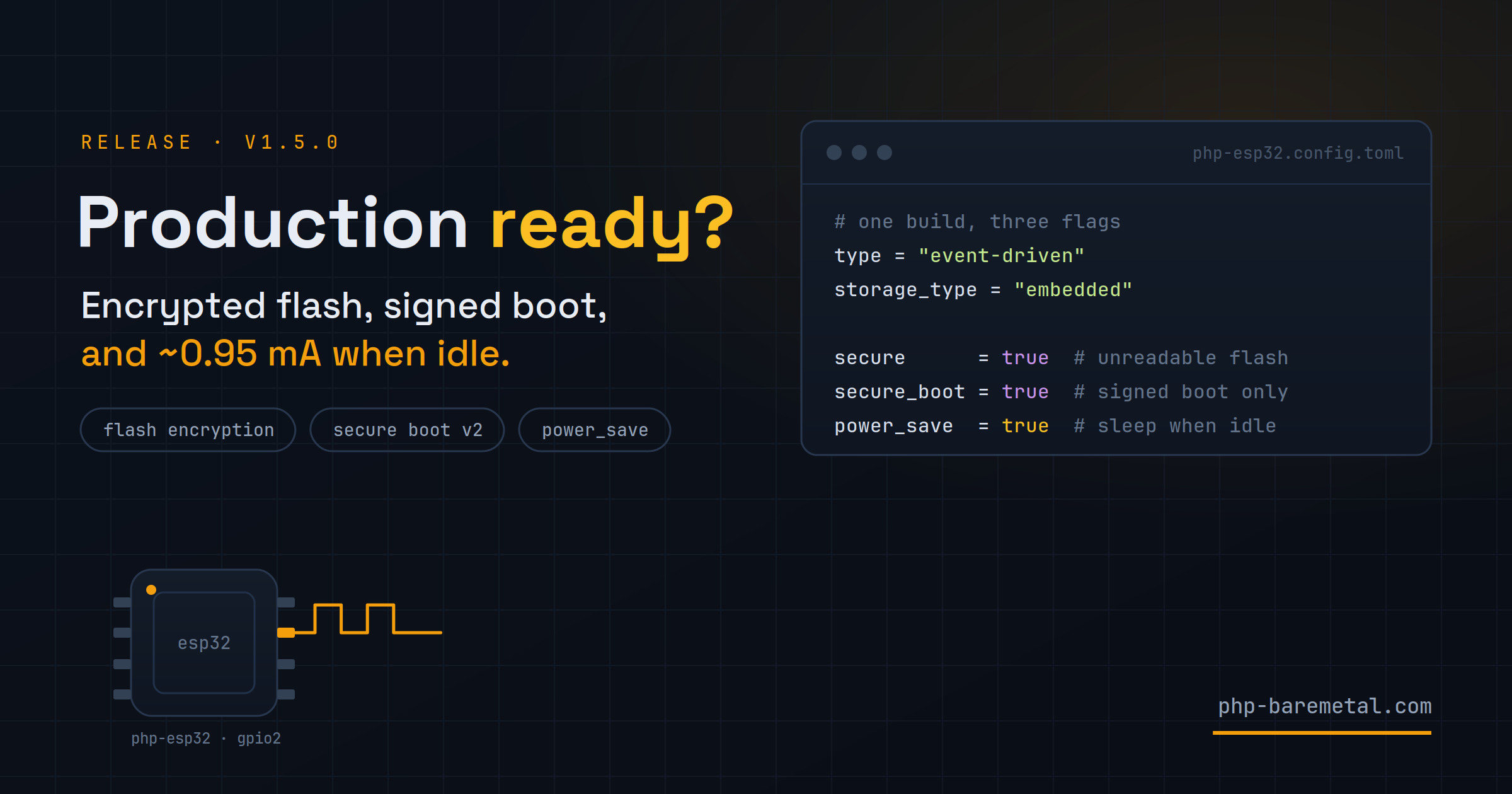
Is php-baremetal/php-esp32 1.5.0 production ready? There is still a lot of work to be done, but this release marks two huge steps forward, focusing on energy consumption and hiding the source code for products coming off the production line.
This version comes out very soon after the previous one, but the steps forward are big enough to deserve a proper release. A security mode wasn't planned. After I announced 1.4.0 on Reddit, which is the main channel I use for updates, a user brought the security discussion back up. It was a huge hint about what was still missing, and it started the race to this release.
If you ship a device running PHP, anyone who gets hold of it can plug it in and read your code. Up to 1.4.0 there was nothing in php-esp32 to prevent it. In 1.5.0 two lines in the config take care of that, and a third one makes the board sleep when it has nothing to do:
secure      = true   # Flash Encryption: the flash is unreadable
secure_boot = true   # Secure Boot v2: only your signed firmware runs
power_save  = true   # automatic light sleep between events
Read this before you set secure = true
secure and secure_boot are permanent. On the first boot after flashing, the chip burns one-time fuses that can never be restored. A protected board stays protected for the rest of its life, there is no way back to factory state, and with Secure Boot, losing the signing key means the board will never accept an update again. The section Why it can't be undone, a bit further down, explains what happens inside the chip. Read it before trying this on a board you care about.
power_save is a normal build option instead: remove it and the next build goes back to how it was. It's covered in the last part of the article.
A dev board is an open book
By default an ESP32 board can be read in full. With a USB cable you can dump the flash (the chip's built-in storage, where the firmware lives) and search through it. In an embedded project, that flash holds your PHP source and the .env baked into the firmware, in plaintext:
esptool read_flash 0 0x400000 dump.bin
strings dump.bin | grep -i secret     # finds your .env values, your PHP, ...
While you're developing, this doesn't matter. On a device you sell, install at a customer's site or leave somewhere unattended, it does: the source is your product, and the .env often holds the credentials for the services behind it. The same dump can also be written to a blank chip of the same model to get a working copy of the device.
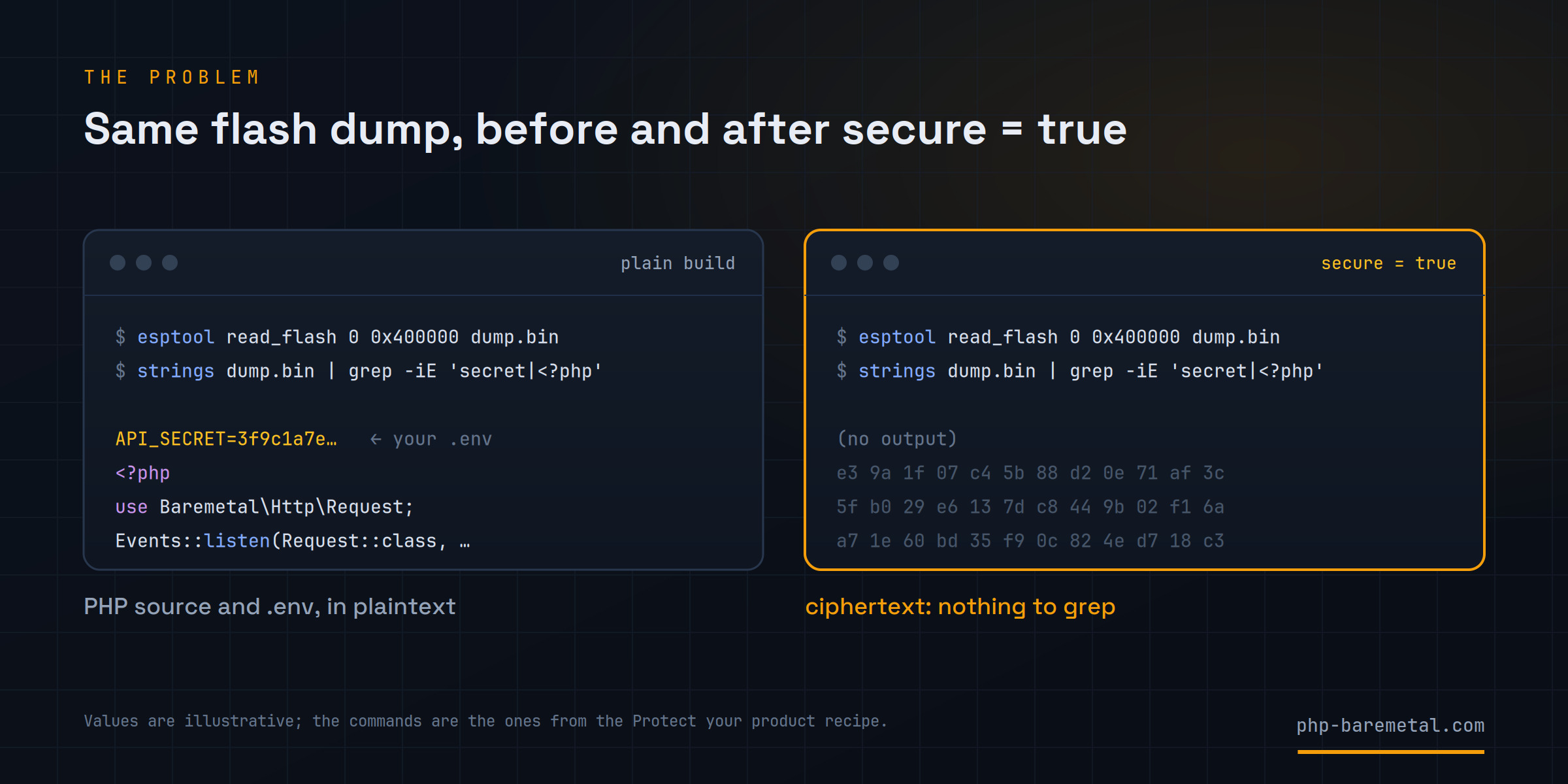
The ESP32 has the hardware to deal with this. 1.5.0 wires two of its features into the build, each behind one flag:
- Flash Encryption encrypts the flash with a key stored inside the chip, which never leaves it. A dump only contains ciphertext, and writing it to another chip is useless, because that chip has a different key.
- Secure Boot v2 makes the chip run only firmware signed with your private key. A copied or modified image won't boot. Both are Espressif features used in commercial products. What 1.5.0 adds is the integration: you set a flag instead of learning the eFuse names and the esptool options yourself. They also share one property you need to understand before using them.
Why it can't be undone
Both features store their keys and settings in eFuses, and that's where the irreversibility comes from.
What an eFuse is
An eFuse is a small element inside the chip. Intact, it reads as 0. Burning it with a short pulse of current changes it permanently, and from then on it reads as 1. A bit can go from 0 to 1 and never the other way: the hardware has no erase operation, so there is none in the chip's ROM, in esptool or over JTAG either.
The ESP32-S3 has a few thousand of these bits, organized in blocks. Espressif uses them for data that has to survive any reflash, such as the MAC address, calibration values and the security settings described below. They're trustworthy precisely because software can't change them back, which is also why a mistake can't be corrected.
The encryption key
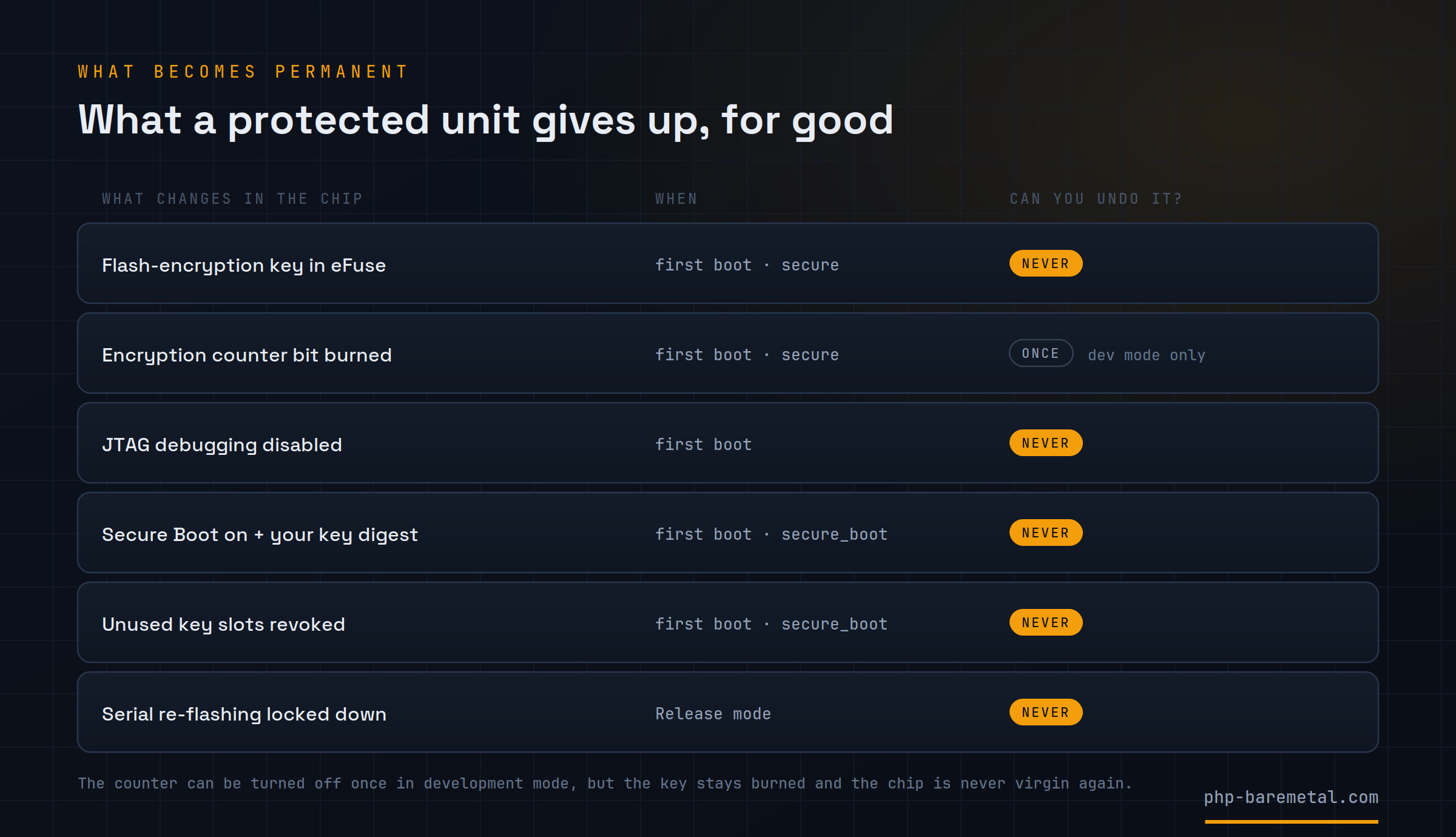
On the first boot of a secure build, the bootloader gets a 256-bit key from the chip's hardware random number generator and burns it into one of the key blocks (BLOCK_KEYn), marked for flash encryption. Then it burns two more bits on that block: read protection and write protection.
After that:
- No software can read the key, including your PHP, the firmware, the bootloader and esptool. Only the AES hardware between the CPU and the flash uses it, to decrypt data as it's read. This is why a dump is useless: the ciphertext can only be decrypted inside that specific chip.
- The key can't be changed or erased. Write protection is a burned bit too, so the key can't be replaced and the block can't be cleared to make the chip new again. So even when everything goes right, the chip is changed for good: it holds a key nobody will ever see, and everything the bootloader writes to the flash from then on is encrypted with it.
The on/off counter
Whether the chip decrypts the flash at boot depends on a 3-bit eFuse counter, SPI_BOOT_CRYPT_CNT. Encryption is on when an odd number of bits are burned and off when the number is even. A new chip reads 000, off. The first boot of a secure build burns one bit, 001, on.
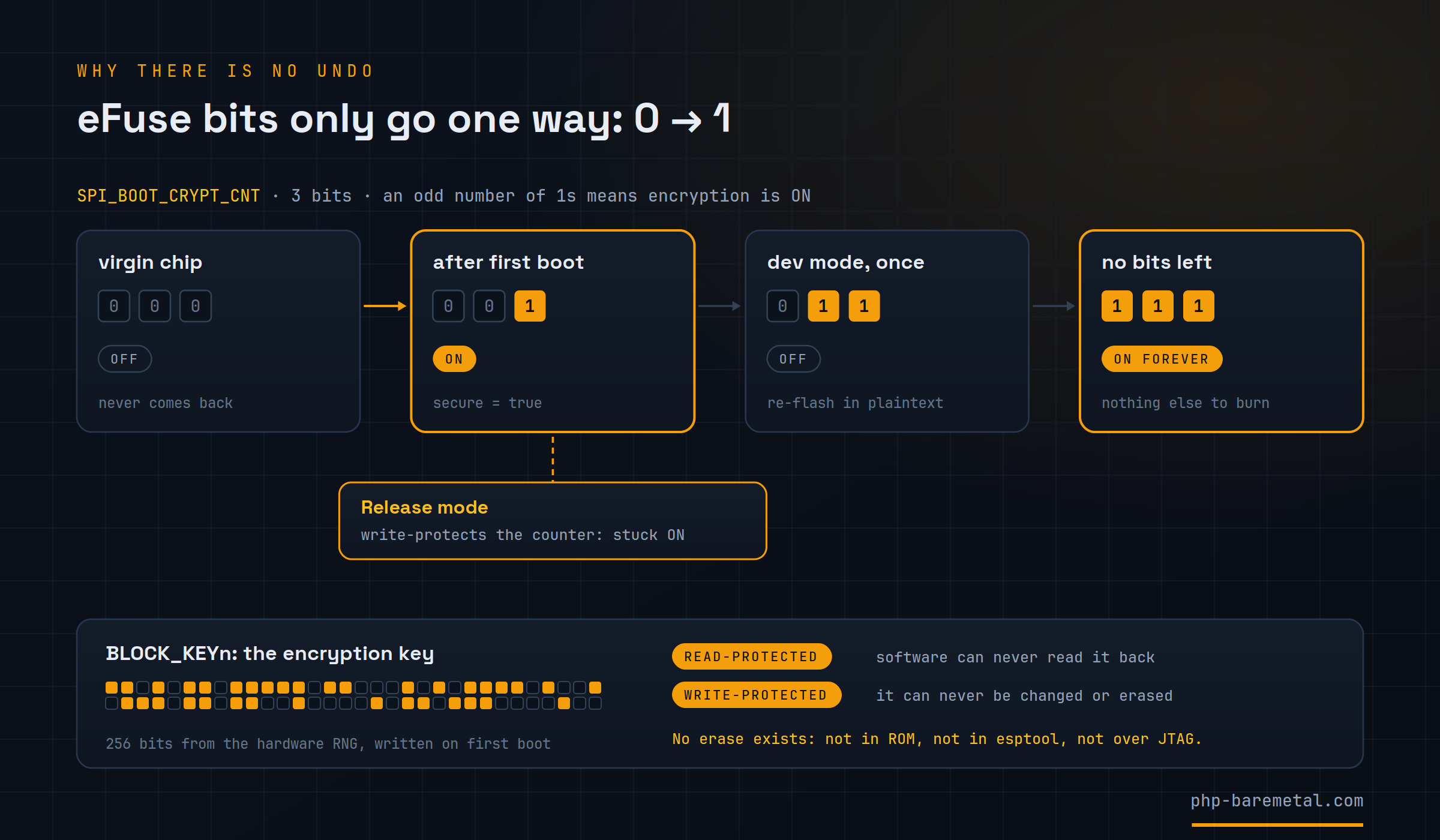
ESP-IDF documents one way to switch encryption off again, in development mode only: burning a second bit makes the count even (011). It doesn't restore anything. The key stays burned, the flash is still ciphertext and has to be re-flashed in plaintext, and one of the three bits is used up. Burning the third bit turns encryption back on (111), and at that point it stays on permanently. php-esp32 doesn't use this path, and I'd treat secure = true as one-way from the start.
Release mode removes that option as well. It burns the write protection of the counter itself, freezing it on, and disables the encryption service of the serial download mode, which is what development mode relies on to keep re-flashing a protected chip.
Secure Boot and the signing key
Secure Boot works the same way. On the first boot of a secure_boot build, the bootloader burns the SHA-256 digest of your public key into a key block, write-protects it, and burns SECURE_BOOT_EN. From then on, at every boot, the chip's ROM (which can't be modified) checks that bit and verifies the bootloader's RSA-3072 signature against the stored digest; the bootloader then does the same for the app. An image whose signature doesn't match is not started.
Three things make this permanent:
SECURE_BOOT_ENis an eFuse bit. It can't return to0, and there is no setting that makes the ROM skip the check.- The unused key slots are revoked. The chip can store up to three key digests. php-esp32 provisions one key per unit, and on the first boot the bootloader burns the revocation bits of the other two slots, so a second key can't be added later.
- The private key can't be recovered from the digest. The chip only stores the digest of the public key, and nobody, Espressif included, can derive the private key from it.
Other permanent changes
Enabling Flash Encryption and Secure Boot also disables JTAG debugging on the chip for good, so a hardware probe can't be used to read memory or get around the checks. A protected board can't be used as a debug board anymore.
Permanent doesn't mean bricked
A board with secure = true in development mode keeps working normally: it runs your firmware and you can keep flashing it with phpflash flash. It just can't go back to being a plaintext chip.
A unit becomes unusable in three cases, each avoidable:
- The first boot is interrupted. Encrypting the flash in place takes a few seconds. A reset or a power cut in the middle leaves the flash half-encrypted and the board in a boot loop. After flashing, leave the board alone for 30 to 60 seconds.
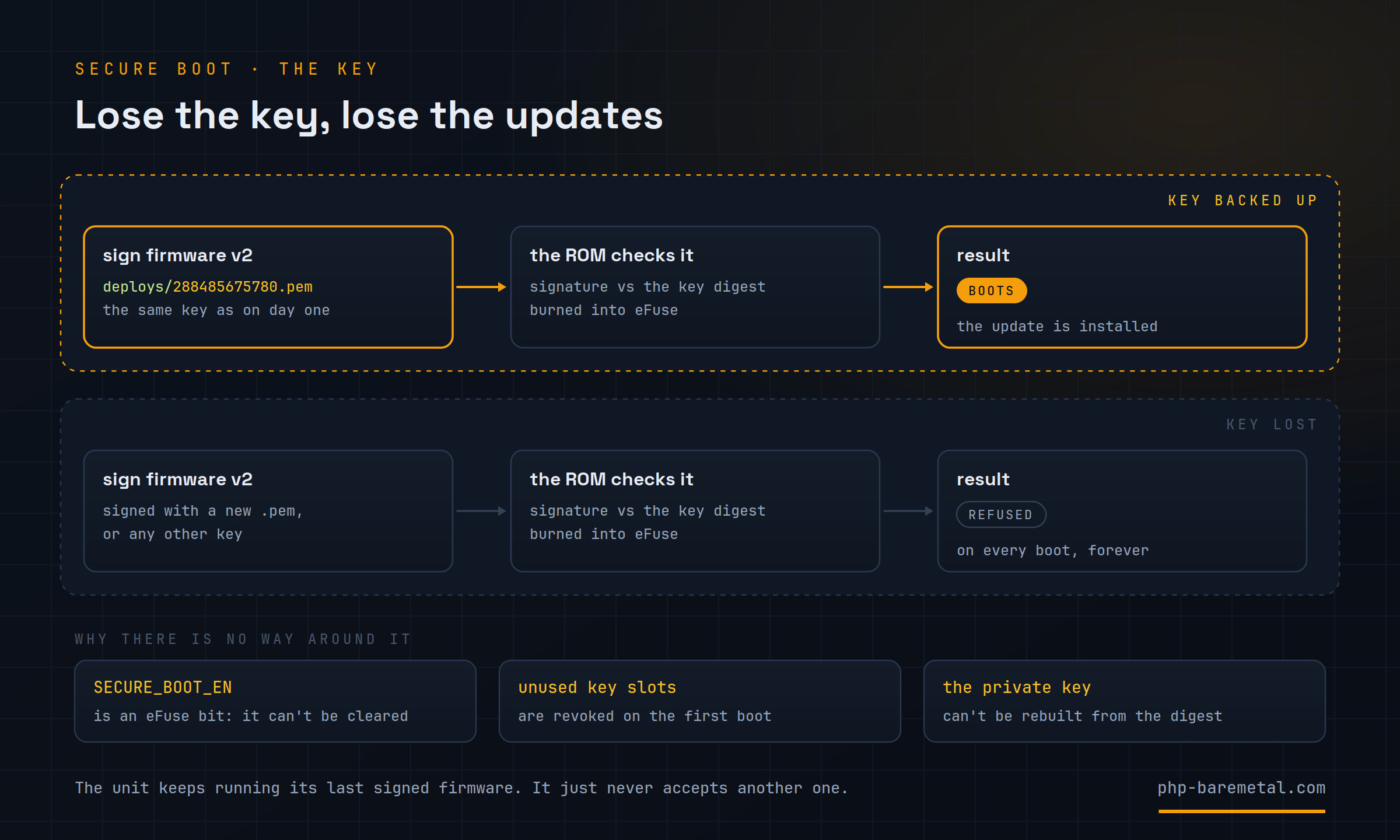
- The Secure Boot key is lost. The board keeps running its last firmware but can't be updated anymore. Back up the key before the first boot.
- Release mode is enabled too early. It's one-way and locks the serial path used for flashing. Use it only on units ready to ship, after the whole flow has worked on a test board.
Flash Encryption: one flag, unreadable flash
To enable it, add secure = true to the project config. A secure build does two things. It turns on Flash Encryption in development mode in the firmware configuration, and it marks the storage partition, the read-only FAT image holding the embedded PHP source, as encrypted. The second part is needed because ESP-IDF encrypts the app automatically but encrypts data partitions only when they're flagged: without the flag, the PHP source would stay in plaintext. The .env is compiled into the app image, so it's covered without anything extra.
Then build and flash as usual:
phpflash build --clean
phpflash flash
The first flash is written in plaintext. On the first boot, the bootloader generates the key, burns it into eFuse, burns the first counter bit and encrypts the flash in place. From that moment the contents can't be read from outside.
Don't interrupt the first boot
The first-boot encryption has to run undisturbed: a reset or a power cut halfway corrupts the flash and leaves the board in a boot loop. On boards with native USB, like the ESP32-S3-Zero, opening a serial monitor resets the chip, so flash, wait 30 to 60 seconds, and only then connect. If it fails before the key is burned, the board can be recovered by re-flashing in plaintext.
To check the result, dump the flash again: strings dump.bin | grep -i secret returns nothing. phpflash discover also reads the eFuses and reports the protection state:
Flash encryption: enabled
Secure boot:      enabled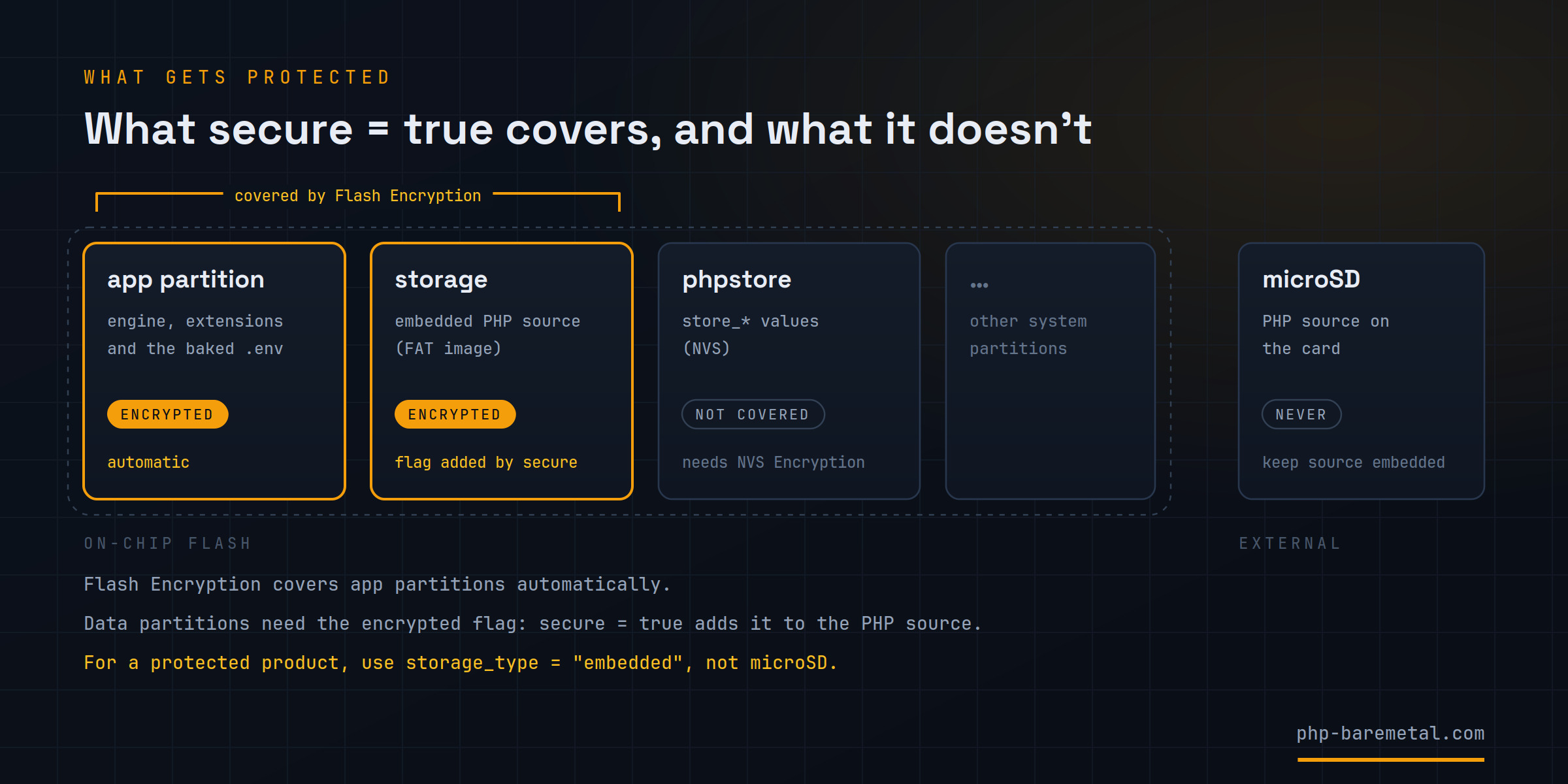
Two things are not covered:
- Values written with
store_*are kept in an NVS partition, which Flash Encryption doesn't cover. Protecting secrets written there at runtime requires NVS Encryption, whichsecuredoesn't configure yet. - PHP source on a microSD card is never protected, because the card is external and stays in plaintext. For a protected product, keep the source in the firmware with
storage_type = "embedded".
Secure Boot v2: only your firmware runs
Flash Encryption prevents reading the flash; Secure Boot prevents running firmware you didn't sign. It's enabled with the second flag:
secure      = true
secure_boot = true
Each unit gets its own signing key, named after the board's MAC address and stored in deploys/<MAC>.pem. phpflash build takes care of it: with the board connected, it reads the MAC and the first time generates the key (RSA-3072, saved with 600 permissions), then signs the bootloader and the app. Later builds reuse the existing key without needing the board. To prepare a key for a board that isn't connected, run phpflash secure-key --mac 28:84:85:67:57:80.
On the first boot the chip burns the public-key digest and SECURE_BOOT_EN and revokes the unused slots, as described above. Since the signed bootloader is larger, the partition table moves to 0xc000; phpflash flash uses the right offsets automatically.
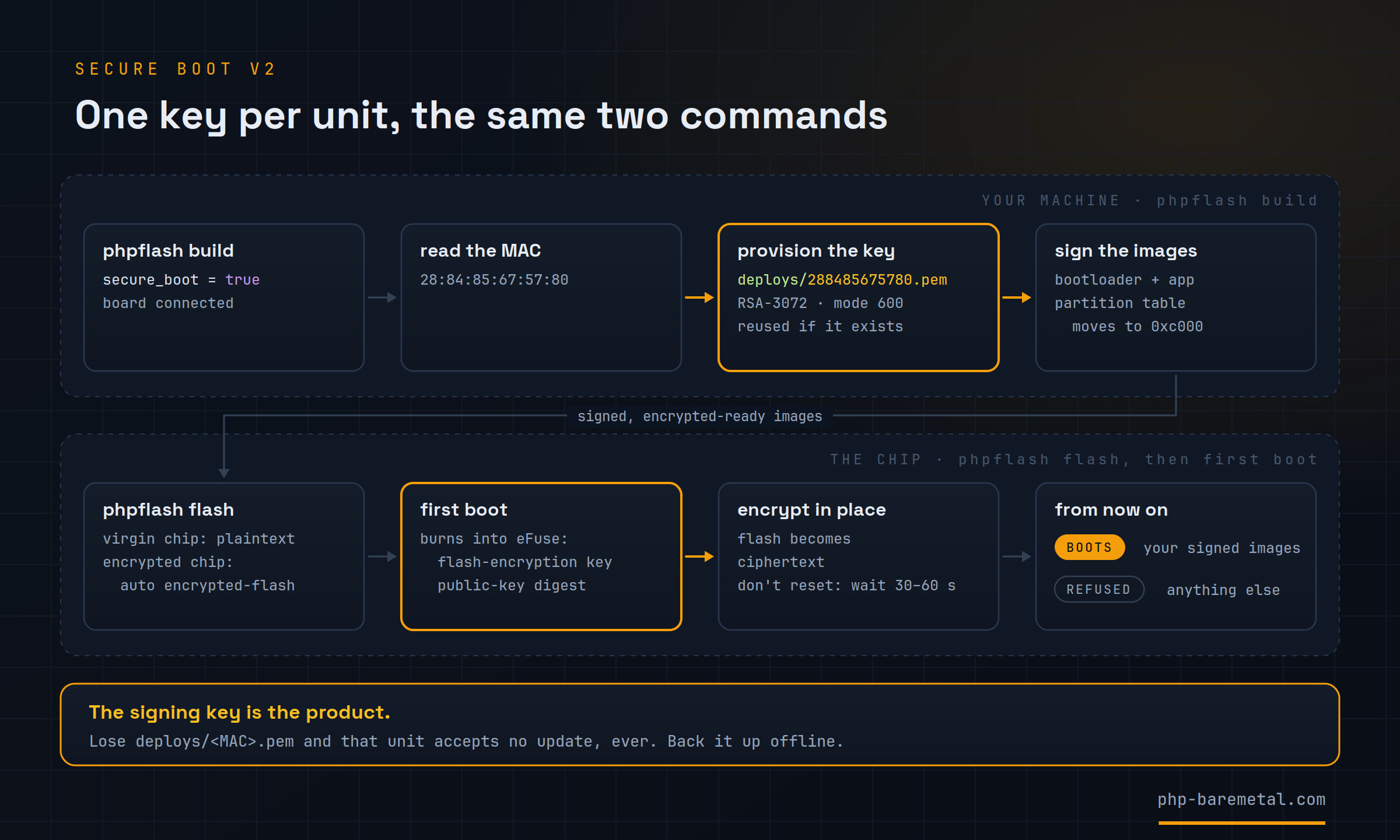
Using one key per unit means a leaked key exposes a single board instead of the whole production run. The downside is that there are as many keys to keep as there are boards, and every one of them is needed for that board's updates:
The signing key is the product
Without deploys/<MAC>.pem you can't sign new firmware for that unit. It keeps running what it already has, but it won't accept any update, and there's no way to fix it afterwards. Back up every key offline, in more than one place, before the first boot. Keep the keys private too: whoever has one can sign firmware that board will run.
The two features side by side
They protect against different things, and a product usually needs both. For comparison, the first column is a plain build with no protection at all:
| No protection (plain build) | Flash Encryption (secure) |
Secure Boot v2 (secure_boot) |
|
|---|---|---|---|
| Protects against | nothing: the flash can be read and any firmware runs | reading the flash: source, .env and app are ciphertext |
running unsigned firmware: copies and modified images don't boot |
| eFuses burned | none | the encryption key, the counter bit, JTAG off | the key digest, SECURE_BOOT_EN, the unused slots revoked |
| Reversible? | nothing to reverse | no; you can't decrypt the flash or get a virgin chip back, but the board stays usable and can be re-flashed | no, and stricter: the chip boots only firmware signed with your key, for the rest of its life |
| What you must keep | nothing | nothing, in the default per-device mode (the key is generated on the chip and never leaves it) | the signing key deploys/<MAC>.pem, offline |
| If you lose it | nothing to lose | nothing to lose: keep flashing with phpflash flash |
that unit accepts no update, ever, and stays on its last signed firmware |
Both together give you a flash that can't be read and a chip that runs only your firmware.
Commands: before vs after
The commands don't change once a board is protected. A protected chip needs later flashes written encrypted: phpflash flash sees that Flash Encryption is already burned and switches to encrypted-flash by itself, letting the chip encrypt the new images in hardware with its own key. No esptool --encrypt and no offsets to work out by hand.
| No protection (plain build) | secure = true |
secure = true + secure_boot = true |
|
|---|---|---|---|
| Build | phpflash build |
phpflash build: marks the PHP source partition encrypted |
phpflash build: also provisions deploys/<MAC>.pem, signs the images and moves the partition table to 0xc000 |
| First flash | phpflash flash |
phpflash flash: written in plaintext, encrypted by the chip on first boot |
phpflash flash: signed, written in plaintext, encrypted by the chip on first boot |
| Re-flash | phpflash flash |
phpflash flash: switches to encrypted-flash automatically |
phpflash flash: encrypted-flash, with images signed by your key |
| Can the flash be read? | yes, with esptool and strings |
no: ciphertext | no: ciphertext |
| Can unsigned firmware run? | yes | yes | no |
What phpflash discover shows |
encryption not set, secure boot not set |
encryption enabled, secure boot not set |
encryption enabled, secure boot enabled |
secure uses development mode, where the chip is encrypted but the serial download path still works, so you can keep testing. Release mode is meant for the units you ship: as described above, it locks the serial path, so it belongs at the end of the process, once the flow has worked on a test board.
Before you burn a unit
-
01
Test on a spare board
Use the same model you'll ship, one you don't mind keeping as a permanently encrypted test board, and run the whole flow.
-
02
Keep secrets where they're protected
Use
storage_type = "embedded", not microSD, and don't keep secrets instore_*for now. -
03
Back up the key before the first boot
Copy
deploys/<MAC>.pemoffline, in at least two places, before powering the board. -
04
Flash, then wait
Run
phpflash flashand leave the board alone for 30 to 60 seconds, without opening a serial monitor. -
05
Verify
Dump the flash and grep it, then check
phpflash discover. -
06
Release mode last
Only on units ready to ship, after all of the above has worked.
The complete guide, including per-device and shared keys, is the Protect your product recipe, and the provisioning flow is in the secure-boot example. For the hardware side, Espressif's pages on Flash Encryption and Secure Boot v2 are the reference.
power_save: sleeping between events
The other half of the release is about power. In the event-driven model introduced in 1.4.0, the reactor spends most of its time waiting for the next event, and in 1.5.0 it can spend that time asleep:
type       = "event-driven"
power_save = true
The flag enables ESP-IDF's automatic power management. When the reactor is idle, waiting on the event queue, the chip goes into light sleep on its own: RAM is retained and it wakes immediately on the next timer, pin interrupt or request. The PHP code doesn't need any sleep calls.
On a bare ESP32-S3-Zero, a script with one heartbeat every 10 seconds idled at ~0.95 mA, against ~49 mA when active, roughly 50 times less, measured with an external 5 V supply.
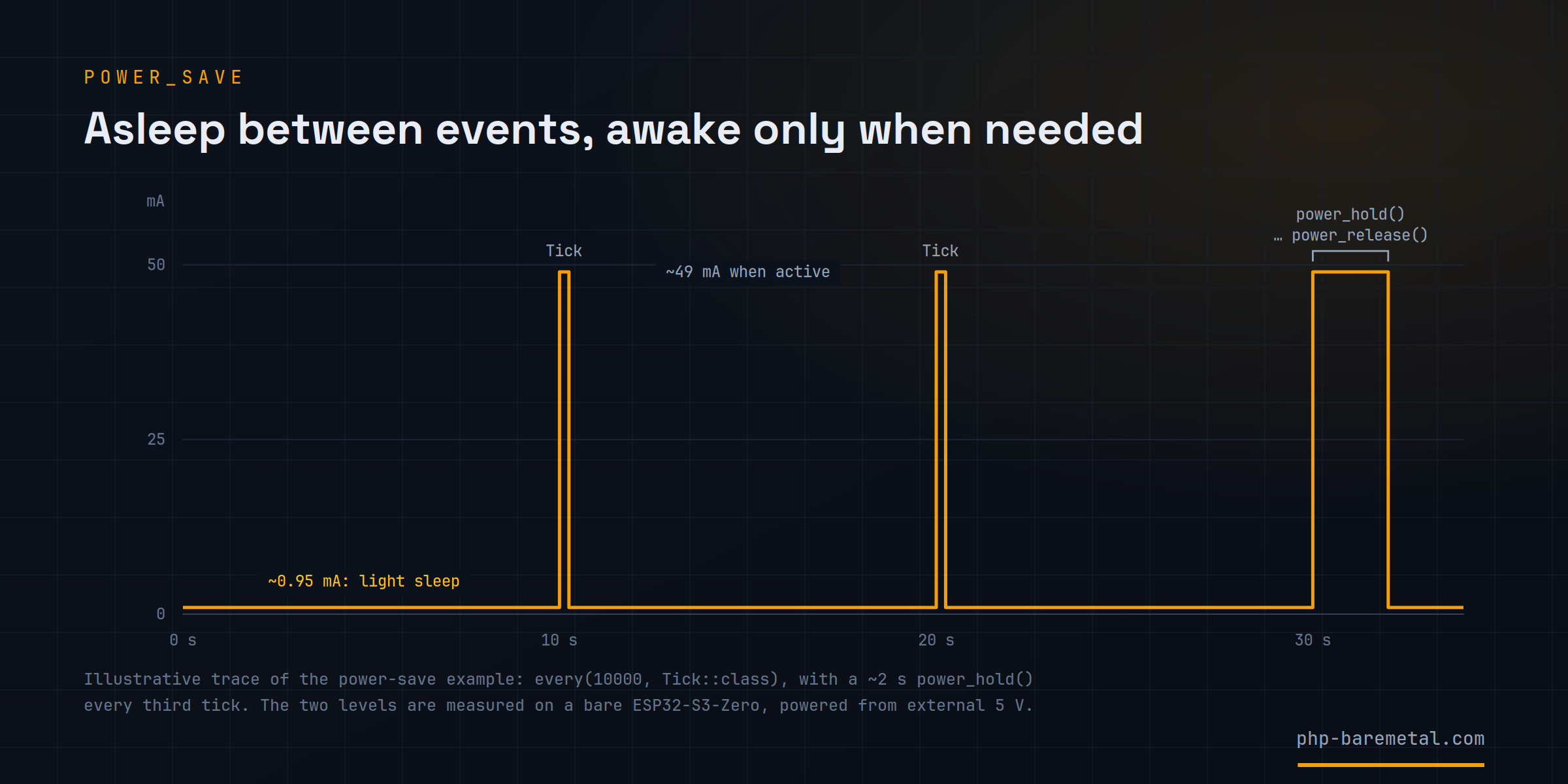
For a section that has to stay awake, wrap it:
power_hold();        // no light sleep from here
// ... time-critical work ...
power_release();     // allow it again
Holds can be nested. If a hold is still active when an event handler returns, the reactor releases it, so a missing power_release() doesn't keep the chip awake indefinitely.
Two things to keep in mind. An I²C bus owned by core 1 (Bus::CORE1, also new in this release) is rejected when power_save is on, because its polling loop keeps the CPU busy and would prevent sleeping; use the default Bus::SYNC. And to measure the real current, power the board from 5 V with the USB data cable disconnected: with the cable attached, the USB driver can stop the chip from going to sleep.
Light sleep also required changes on the device side. watch_button() turns a GPIO into button gestures, with debounce and timing handled in C, so the script only receives events like Click or Held. button_sampling(false) pauses it before a light sleep, and St77916::wake() reinitializes the display after sleep has disturbed its QSPI lines.
watch_button(0, ['click' => Clicked::class, 'held' => Held::class], ['holdMs' => 2000, 'debounceMs' => 30]);Deep sleep isn't part of the firmware yet, because waking up from it depends on how each board is wired. For now it's a small project extension in the power-bench example. On that bench, measured over USB, the S3-Zero drew 49.5 mA active, 1.9 mA in light sleep and 0.56 mA in deep sleep; the remaining floor comes from the USB connection and the board's regulator, not from the chip.
So, is it production ready?
Not entirely yet. Secrets written at runtime with store_* aren't encrypted, and deep sleep still lives in a project extension. Both are on the list.
What changes with 1.5.0 is that two of the main obstacles to shipping PHP on a microcontroller are now covered: the source and the .env can leave the factory unreadable, on a chip that only runs your firmware, and an event-driven device can idle at around one milliampere without any sleep code. When the project started this summer, putting PHP on a product coming off a production line was hard to take seriously. With 1.5.0 it starts from a configuration file, with the caveat that two of its lines burn fuses and can't be taken back.
The release also includes some smaller additions: an I²C bus that runs its transactions on core 1 (Bus::CORE1), and drivers for the MMC5603 magnetometer, with heading(), and the PCF85063 real-time clock. The full list is in the changelog.
Thanks again to the Reddit user who brought security back into the discussion: this release started from that comment. If you build something with it, or find a gap I missed, let me know.
ESP32 is a trademark of Espressif Systems. php-baremetal is an independent project, not affiliated with or endorsed by Espressif or the PHP Group.
Keep reading
PHP on the ESP32 now reacts: events, WebSocket and a second core
Tilt the board and the plot moves in your browser. php-esp32 1.4.0 lets PHP sleep until the hardware wakes it: typed events, live WebSocket, and a second core.
PHP on a $4 chip: its own WiFi, its own web server, control led
An ESP32-S3 boots its own WiFi network, serves a control page written in PHP, and drives its onboard RGB LED live. No router, no cloud, no app.
Real PHP on an ESP32: welcome to the php-baremetal blog
The unmodified Zend engine from php.net, cross-compiled for a microcontroller: what php-baremetal is, what it runs today, and the new WiFi support.